作者o07608 (无良记者)
看板SLG
标题[讨论] FreeCol 使用手册翻译 CH3
时间Thu Oct 10 23:55:12 2013
先行警告:这章的量是整份说明书里量最多的
只看页数的话,占了整份说明书超过1/3,是前两章加起来的三倍
然後因为正式牵涉到游戏本身,也多了不少比较专门的用词
所以我翻译起来比前两章还凌乱
文章中会有不少的(译注:blablabla),大都是我翻译时碰到问题无法解决的地方
希望大家能耐心看完之後替我解惑及指正,感谢>"<
有需要的话我再把它分成几篇文章贴,现在先全部贴上来
===============================
Chapter 3
Interface 介面
This section will provide information about various interface elements, as
well as the keyboard shortcuts and the different actions that can be used in
the game.
这部份有各种游戏介面元素的资讯、键盘快捷键和能用在游戏中的不同动作。
---------------------------------------------------
3.1 Starting the game 开始游戏
---------------------------------------------------
If you installed FreeCol with the system independent installer, or the
Windows installer, there should be a shortcut on your desktop. Double click
the icon in order to start the game. If that does not work, or if you prefer
using the command line, then please read the following paragraphs.
如果你用独立安装器或者Windows安装器安装FreeCol,桌面上会出现捷径,快按两下捷径
图示以开始游戏。如果没作用、或你比较喜欢用指令,那请阅读下面的段落。
------------------------------------------
3.1.1 Command line option 选择用指令列
If you are in the directory in which FreeCol is installed, you can start the
game with the command java -Xmx512M -jar FreeCol.jar. This will tell the
Virtual Machine to load the game and to set the maximum heap size to 512 MB.
Refer to the manual of your Java Virtual Machine for details.
如果你在安装着FreeCol的资料夹中,你能以指令java -Xmx512M -jar FreeCol.jar开始
游戏。这指令会告诉虚拟机器载入游戏,并把最大记忆体设为512MB。参阅你的Java虚拟
机器使用手册来得知细节。
There are many other Java options, but you probably won’t need to change the
default settings. FreeCol is developed in English, but it includes
translations into many other languages, some of which are not very complete,
however. Java will automatically select the translation for your locale, if
available, and English otherwise. If you should wish to select a different
language, or if language selection fails, you can choose a different language
from the preferences menu.
有很多其他的Java设定,但你应该不会需要动到初始设定。FreeCol用英文开发,但它也
包含许多语言的翻译版,不过有些语言还翻的不完整。Java会自动选择你所在地区的语言
(如果有这翻译版的话),要不就是英文。如果你想选择别的语言,或者选择语言时出了
问题,你能从偏好选单中选择不同的语言。
FreeCol also provides several application-specific command line options:
FreeCol也提供一些特殊用途的指令:
--freecol-data DIR Specify the directory that contains FreeCol’s data
files. In general, you will only need to use this if you have installed a
modified copy of FreeCol’s data files.
--freecol-data DIR指定含有FreeCol资料档的目录(资料夹)。只有当你已经安装修改过的
FreeCol,你才需要这个这个指令。
(其实就是叫游戏去读取MOD档案所在的目录)
(译注:感谢THC13更正)
--windowed[[=]WIDTHxHEIGHT] Run FreeCol in windowed mode instead of full
screen mode and set the window width and height. You will need this if your
window manager or Java Virtual Machine do not (correctly) support FreeCol’s
full screen mode. If you use Linux and Java 5, for example, you should set
the window width to the width of your screen, but probably set the window
height slightly lower than the height of your screen, in order to leave space
for the menu bar, dock etc.
--windowed[[=]WIDTHxHEIGHT]会以视窗模式而非全萤幕运行FreeCol, 并能设定长宽。
如果你的视窗管理员或Java虚拟机不(完全)支援FreeCol全萤幕模式,你会需要它。举
例来说,如果你在Linux系统上用Java5,你要设定你萤幕的长宽,但可能要让视窗宽比你
的萤幕宽稍微小一点,为了留给选单条空间。
--load-savegame SAVEGAME_FILE Load the given savegame. This is particularly
useful in combination with the client option show savegame settings.
--load-savegame SAVEGAME_FILE会载入选定的存档。这和用户端的「显示存档设定」一
起用会很有用。
--no-intro Skip the introductory video.
--no-intro会跳过介绍影片
--no-sound Run FreeCol without sound. Note that the game does not yet contain
any music, so the only sounds you will hear will be special effects.
--no-sound会关掉FreeCol的音效。记住游戏还没有任何音乐,因此你原本只会听到效果
音。
--usage Display the help screen.
--usage会叫出帮助画面。
--version Display the version number.
--version会告诉你这是第几版。
--server PORT Start a stand-alone server on the specified port. If you don't
know what that means, you will not need the option.
--server PORT会用特定的port开启一个独立伺服器。如果你不知道这是什麽意思,那你
用不到这指令。
--server-help Display a help screen for the more advanced server options.
--server-help会叫出包含伺服器选项的帮助画面。
--font[[=]FONTSPEC] Override the default font with a Java font specifier
(e.g. Arial-BOLD-12).
--font[[=]FONTSPEC]会用Java字体(像是Arial-BOLD-12)取代预设字体。
--home-directory DIRECTORY Use the given directory instead of your default
home directory to load and save games, options and log files. You can use
this in order to run the game from a USB stick, for example. Please note that
specifying a save game file on the command line will override the save game
directory.
--home-directory DIRECTORY会用给定的路径来载入、储存游戏、设定和记录档,而非预
设的家目录。你能用这指令来从像是USB之类的地方跑游戏。请注意,在指令列中输入的
特定存档路径会取代原本的存档路径。
--clientOptions FILE Override the client options file (normally options.xml
in the freecol directory).
--clientOptions FILE会重写用户端设定档(通常是freecol资料夹中的options.xml档)
--timeout TIMEOUT Specifies the number of seconds the server should wait for a
player to answer a question (e.g. demands from natives). This is ‘infinite’
by default in single player mode, and 60 seconds in multiplayer.
--timeout TIMEOUT会设定伺服器要等玩家几秒,透过对玩家抛问题来决定是否要继续等
(像是问他国籍)。在单人模式中,预设是「无限」,而多人时预设60秒。
There are several other options that you will probably only be interested in
if you are a developer:
有些指令是在你要开发游戏时才要用到:
--no-java-check Skip the java version check.
--no-java-check会跳过Java版本检查。
--no-memory-check Skip the memory check.
--no-memory-check跳过记忆体检查。
--log-level LEVEL Set the java log level.
--log-level LEVEL会设定java记录等级。
--check-savegame GAME Check the integrity of a saved game, exit with status
equal to the result of the check.
--check-savegame GAME检查游戏存档是否完整,结束时会跑出检查结果。
--seed SEED Seed the random number generator.
--seed SEED产生随机数目的产生器。
--debug[[=]MODES] Start the game in (non-scoring) debugging mode. The argument
is a comma separated list of the debug modes: ‘menus’ (enables the debug menu
and extra entries in popups and panels), ‘init’ (generates a starting colony)
, and ‘comms’ (massive client-server communications tracing). It defaults to
‘menus’ if null.
--debug[[=]MODES]会以(不留记录的)除错模式开启游戏。这个参数是一个用逗号分开
的,除错模式的列表:”menus”(开启除错选单及能进入popups 和panels)、”init”
(产生开始的殖民地)和”comms”(大量用户端伺服器的通讯记录)。如果没输入参数
的话,那就会开启”menus”。
--debug-run[=]TURNS[,SAVENAME] Run in debug ‘menus’ mode for the specified
number of turns, then optionally save the game to the specified save name and
quit.
--debug-run[=]TURNS[,SAVENAME]
(译注:这段看不懂._.)
------------------------------------------
3.1.2 Game setup 设定游戏
Main panel 主控版
If you start FreeCol without command line options, the game will first open a
dialog that allows you to continue a game already started, to start a new
game, to open a saved game, to open the map editor, to set various options,
and to quit.
如果你不是用指令列开启FreeCol,游戏会先跳出一段对话框让你继续游戏、开始新游戏
、开启存档、开启地图编辑器、设定、以及离开。
If you decide to start a new game, you will be presented with another dialog,
which enables you to start a single-player game, to retrieve a list of
servers from meta.freecol.org, to join a multi-player game, or to start a new
multi-player game.
如果你要开新游戏,你会看到其他对话框,要你选择单人模式、从meta.freecol.org中选
择一个伺服器、加入多人游戏、或者开启新的多人游戏。
New game 新游戏
If you start a new single-player or multi-player game, you must also decide
whether to use fixed or selectable national advantages, or no national
advantages at all. In the original game, national advantages were always
fixed. The Dutch, for example, always had a trading advantage. You must also
decide which rule set to use. At the moment, FreeCol comes with two rule
sets, namely “FreeCol” (the default) and “Classic”. In the future, we
will probably distribute additional rule sets contributed by players. If you
join another game, then you must accept the settings the game’s owner
selected.
如果你开始一个新的单人或多人游戏,你必须也决定要用固定或可选的国家加成,或都没
有加成。在原版游戏中,国家加成是固定的。举例来说,荷兰人在贸易上有加成。你也要
决定要用哪种模式,目前FreeCol有两种模式,也就是”FreeCol”(预设)和”Classic
”。未来我们可能会提供其他玩家提供的游戏模式。如果你加入其他游戏,那你必须接受
开这个游戏的人的选择。
Difficulty level 难度
The next screen allows you to select an appropriate difficulty level. The
game comes with five pre-defined difficulty levels: “Very Easy”, “Easy”,
“Normal” (the default), “Hard” and “Very Hard”. The level is defined by
about two dozen different settings, such as the amount of gold you start the
game with. If you select “Very Easy”, for example, you will start with 1000
gold, if you select “Easy”, you will start with only 300 gold, and in
higher levels you will start entirely penniless.
下一个画面会要你选择适合的难度。游戏有五种定好的难度:「超简单」、「简单」、「
正常」、「难」、「超难」。大约24个不同设定来定义难度,像是起始金钱之类的。举例
来说。如果你选择「超简单」,你一开始会有一千元。如果你选择「简单」,那你一开始
只会有三百元。更高难度的话你会身无分文。
You can also create your own custom difficulty level. Just select the
difficulty level that is closest to what you want (i.e. select “Very Hard”
if you want a difficulty level that is even harder) and press the “edit”
button to change the settings. Please note that the range of all settings is
limited.
你也可以创造你自己的难度。只要选择接近你想要的难度的选项(也就是说,如果你要的
难度比「超难」还难,就选这个选项),然後按「编辑」按钮来改变设定。请记住所有设
定都是有范围的。
Select nations 选择国家
The next screen allows you to select which European and native nations will
be present in the game, which colour will be used to represent them, and
whether they will be played by humans or computer players. At the moment,
human players can only select a European nation. In future, that might
change. If you chose selectable national advantages, then you can also change
the national advantage of the nation you are playing.
下一个画面要你选择哪些欧洲和当地国家会出现在游戏里,国家会用颜色来区别,由人或
电脑玩家来操控。目前人类玩家只能选择欧洲国家,未来这可能会改变。如果你选择国家
加成可选,那你也能在这里改变你玩的国家的国家加成。
The original game only included four European nations, namely the Dutch,
English, French and Spanish. FreeCol includes eight, mainly in order to
support large multi-player games, but also in order to include the
Portuguese, who were sadly absent from the original game. By default,
however, only the original four European nations are selected.
原版只有四个欧洲国家,荷兰、英国、法国和西班牙。FreeCol有八个国家,主要是为了
支援大型多人游戏,也是为了把在原版中悲惨的缺席了的葡萄牙给加进来。然而,预设值
仍然是一开始的四个欧洲国家。
The table headers for the Nation and Advantage columns are buttons that will
take you to the relevant sections of the Colopedia. Also see the chapter on
your Home Country for further information on the national advantages of
various European nations.
「国家与加成」一栏的按钮会连到Colopedia(译注:与FreeCol有关的百科)的相关部分
。要得知更多关於国家加成与各个欧洲国家的资讯,请看「你的祖国」一节。
This screen also allows you to change various game options.
这个画面也能让你更动各种游戏设定。
Joining a game 加入一个游戏
If you choose to retrieve a list of running games from the metaserver, your
computer will attempt to establish a connection to meta.freecol.org, port
3540. You will be presented with a list of games, from which you can select
one to connect to. Please note that the list will frequently be empty, since
not that many public multi-player games are being run.
如果你选择从metaserver中列出来的所有进行中游戏中找一个,你的电脑必须要和
meta.freecol.org, port 3540建立连结。你会看到一串游戏列表,能选择其中一个连进
去。要知道列表经常会是空的,因为没有这麽多公开多人游戏在跑。
If you wish to join a multi-player game, you must enter the IP address of a
server that is running a FreeCol game as well as the port it is running on.
The default port is 3541. If you join a multi-player game, you can also
choose a nation and colour, but another players might already have selected
your preferred nation.
如果你要加入一个多人游戏,你要输入一个有在运行FreeCol的伺服器的IP和port,预设
的port是3541。如果你加入了一个多人游戏,你也能选择国家和颜色,但可能已经有其他
玩家选走你想要的国家了。
Setting up a multi-player game 设立一个多人游戏
(译注:这段翻的七零八落的,求大家帮忙)
If you wish to start a multi-player game, then the IP address of the server
will be that of your computer, but you must still select a port to run the
server on. Again, the default port is 3541. You must also decide whether you
want to run a public server or a private server. By default, you start a
private game, which means that the game will not be available on the
metaserver. Furthermore, you must decide on the number of European players
(see above), and whether to use national advantages. A multi-player game may
be more balanced if you do not use them, so that all players start with the
same units and abilities.
如果你想创立一个多人游戏,那伺服器IP就是你的电脑的IP,但你仍要选择一个port来让
伺服器运作,预设port同样是3541。你也要决定你要用公开或是私人伺服器。预设是私人
游戏,这代表不会在metaserver看到你创的游戏。此外,你要决定欧洲玩家的数目(看上
述),以及是否要国家加成。如果不用国家加成的话,所有玩家都能在同样的出发点,多
人游戏会更平衡。
FreeCol is a client-server game. The game server takes care of the game
logic, and the client provides the graphical user interface. One or several
clients can connect to the game server via the network. In the case of a
single-player game, all other players are handled by the game server. At the
moment, however, your client uses a network connection even if the server is
running on the same computer.
FreeCol是一款用户伺服器导向的游戏,游戏伺服器掌管游戏逻辑运算,用户伺服器则提
供使用者图像化介面。一或多个用户能透过网路连结游戏伺服器。以单人游戏为例,其他
玩家都由游戏伺服器掌控。然而,你的用户端也能同时连到网路,尽管伺服器就在同一台
电脑上。
This means that you can only run FreeCol if you have the necessary privileges
to bind an unprivileged port. If you use a personal firewall that blocks the
port you wish to use, you will need to configure your firewall accordingly.
If you wish to retrieve a list of games from the metaserver, you also need to
configure your firewall to permit connections to that server, port 3540. In
order to connect to a server, your client also needs to bind a port. Which
port depends on the operating system you use.
这代表如果你有必要优先权去连结一个没有优先权的port,你能只跑FreeCol。如果你的
个人防火墙挡住你想用的port,你需要设定你的防火墙。如果你想要在metaserver上浏览
游戏,你也需要设定防火墙来让它允许与伺服器,port3540的连结。为了连到伺服器,你
的用户端也需要连到一个port,这个port与你用的系统有关。
If you are running a public game server, then your firewall must also permit
the clients to connect to the port of the game server.
如果你正在跑一个公开游戏伺服器,那你的防火墙也需要允许其他用户端连到这个伺服器
的port。
----------------------------------------------
3.1.3 Map Generator Options 地图产生器设定
(译注:这段翻的七零八落的,求大家帮忙)
The map generator options allow you to import a map, and to set several
parameters that influence the size and terrain of a randomly generated map.
FreeCol includes several hand-made maps, which can be selected by clicking on
the map icon.
地图产生器设定能让你输入一张地图,并设定各种能改变随机产生的地图的大小、地形的
参数。FreeCol包括数张手制地图,能透过点击地图图标来选择它们。
To import a map, either select one of the maps in the shortcut panel, enter
the name of a file in the import field, or click on the browser button in
order to select a file via a file browser. You have the choice to import
terrain, bonuses, rumors and settlements. At the moment, the map editor does
not provide all these options, however.
要输入一张地图,除了在捷径板上选择一个地图、输入存在於地图输入区中档案的名字,
还能点浏览器按钮以连到档案浏览器来找档案。你能选择输入地形、福利(译注:啥鬼)
、失落城市和居住地。然而目前的地图编辑器还不能提供所有这些功能。
The map generator tab allows you to select the size of the map, as well as
the amount and the general shape of the land on the map. The terrain
generator tab allows you to select the number of rivers, mountains, lost city
rumors, native settlements, forests, and bonus tiles on the map, as well as
the humidity and temperature of the map. The latter settings will influence
the terrain.
地图产生器标签能让你选择地图大小,和地图中陆地的数量和形状。地形产生器标签让你
选择河流、山脉、失落城市、当地部落、森林和额外地砖的数量,还能决定地图的湿度和
温度。後续设定还会影响地形。
--------------------------------------------
3.1.4 Game Options 游戏设定
The game options allow you to select several parameters that influence game
play, such as non-standard rules and victory conditions.
游戏设定让你调整某些会影响游戏进行的参数,像是非标准规则和胜利条件。
Map Options 地图设定
The option Turns to Sail allows you to change the number of turns required
to sail between Europe and the New World. By default, the journey takes three
turns.
「航行时间」让你改变航行於欧洲和新世界之间所花的回合数,预设是三回合。
The Settlement Limit Modifier allows you to relax the settlement limit,
which currently applies only to the number of Wagon Trains that your colonies
can support.
「居住地限制修改器」让你能放松居住地本身的限制,现在只会限制你的殖民地所能负担
的马车队数量。
The checkbox Fog of War allows you to toggle whether the areas of the map
your units can not currently see are marked.
选取方块「战争迷雾」让你选择是否要让那些你的单位视野看不到的地图显示出来。
The checkbox Exploration Points allows you to award exploration points for
regions discovered by the players. By default, exploration points are only
awarded for the discovery of the Pacific Ocean.
选取方块「探险点数」让你能让玩家透过发现新地区得到探险点数。预设是探险点数只能
透过发现太平洋得到。
The checkbox Amphibious Moves enables offensive units to attack colonies
from a ship. This is necessary in order to prevent the construction of
unassaillable strongholds on small islands.
选取方块「两栖行动」能让攻击性单位从船上攻击殖民地。为了避免无敌铁龟岛的情况发
生,必须勾选这个。
The checkbox Empty Trade Units enables empty carriers to trade with foreign
settlements, in other words to buy foreign goods without selling goods first.
选取方块「空的贸易单位」能让没装东西的运输单位与外国人的居住地贸易。也就是说,
在还没卖东西之前就先买舶来品。
The checkbox Chief Contact toggles whether all interactions with a settlement,
such as sending a unit to learn a skill, automatically contact its chief.
选取方块「首长联络」选择是否要让所有对居住地的联络,像是让一个单位去学技术之类
,都自动透过该居住地的首长。
The checkbox Enhanced Missionaries grants missionaries various abilities,
making them more valuable than in the original game.
选取方块「强化教会」让教会有更多能力,比在原版中更有价值。
The Gift Probability influences the amount of gifts your colonies will receive
from the natives.
「礼物机率」影响原住民送给你的殖民地礼物的数量。
The Demand Probability influences the number of demands your colonies will
receive from the natives.
「要求机率」影响原住民对你的殖民地提出要求的数量。
The checkbox Continue Recruiting Founding Fathers allows you to elect Founding
Fathers after independence has been granted.
选取方块「继续招募国父」让你能在独立後举办国父选举。
The checkbox Teleport REF enables the Royal Expeditionary Force to arrive
directly at its destination, as in the original game. If this option is
disabled, the REF must sail to its destination and can be attacked en route.
选取方块「传送REF」能让皇家远征军像原版一样直接到达目的地。如果这选项被取消,
REF必须乖乖航行,而且能在途中攻击它。
The option Starting Positions allows you to determine whether the various
European nations will start at positions similar to those of the original
game, at positions closer to their historical landfalls, or at random
locations.
选项「起始点」能让你决定各种欧洲国家会从原版起始点、历史上真正的起始点、或随机
地区开始游戏。
Colony Options 殖民地选项
The checkbox Custom House Ignores Boycott enables Custom Houses to ignore
boycotts and export boycotted goods regardless. This does not apply to
carriers, however, and does not prevent further boycotts by the Crown. This
feature of the original game is considered a bug by the FreeCol team and is
therefore disabled by default in the FreeCol rule set.
选取方块「海关忽略抵制」能让海关忽略抵制规则,并能出口被抵制的货物。这并不适用
於运输单位,也不能避免国王做出的进一步抵制。这在原版中被FreeCol团队认为是一个
bug,因此在FreeCol中是预设取消的。
The checkbox Experts Have Connections enables experts working in factory-level
buildings to produce a small amount of goods even if the necessary raw material
are not generally available. This alleged feature of the original game is also
disabled by default.
选取方块「专家有连结」能让专家在原料缺乏的情况下也能在工厂等级的建筑生产较少数
量的货品。这在原版中令人疑惑的状况也在预设中被取消掉了。
The checkbox Save Production Overflow, toggles whether the construction of
new units or buildings uses up all available hammers, or only the exact
number required. In the latter case, the remaining hammers will remain
available for the next building project.
选取方块「保留过量的生产力」会选择是否要在建造新单位或建筑时用所有的鎚子,或只
要用真正需要的数量。在後面的情况,剩下的鎚子在下一次建筑时还能用。
(译注:感谢s2327259修正)
The checkbox Allow Student Selection enables (and obliges) you to explicitly
assign students to teachers. The original game always selects a random student
from those available.
选取方块「能够选择学生成为老师」能(和迫使)明确指定某个学生变成老师。原版总是
从那些能成为老师的学生随机选择一个变成老师。
The checkbox Buildings Require Upkeep toggles whether you have to pay for
the upkeep of all buildings not present in a newly established colony. If you
fail to pay the upkeep, you will suffer a production penalty. This feature
was apparently considered for the original game, but was removed during
play-testing.
选取方块「建筑需要保养」会选择是否要替在新建立的殖民地中,所有还没盖好的建筑物
副保养费。如果你没付的话,将会受到生产力惩罚。这机制在原版中有,但目前被移除了
The option Natural Disasters influences the probability of natural disasters
devastating your colonies. If this option is set to zero, no natural disasters
will occur.
选项「自然灾害」会影响自然灾害破坏你的殖民地的机率。如果选择0的话,那就不会有
任何自然灾害。
Victory Conditions 胜利条件
Victory conditions allow you to choose how a European player may win the
game:
胜利条件让你选择一个选择欧洲国家的玩家如何赢这场游戏:
First Player to Gain Independence
第一个独立的玩家
All Other European Players Defeated
其他欧洲国家玩家都被击败
All Other Human Players Defeated
其他人类玩家都被击败
Please note that if you start a single-player game and select the defeat of
all other human players as a victory condition, your game will end
immediately, since the victory condition already applies.
请记住如果你玩单人游戏并选择击败所有其他人类玩家作为胜利条件,游戏会立刻结束,
因为胜利条件已经达到了。
Year Options 年代设定
The Starting Year determines the year in which the game starts (defaults
to 1492).
「起始年份」决定游戏从几年开始(预设是1492年)
The Season Year determines the first year with two turns or seasons per year
(defaults to 1600).
(译注:这句话看不懂0.0)
The Mandatory Colony Year determines the first year in which it becomes
mandatory for European players to own at least one colony in order to avoid
defeat (defaults to 1600).
「强制殖民年份」决定选择欧洲国家的玩家要在哪年前至少建立一个殖民地,以免被强制
宣告失败(预设是1600年)
The Last Game Year determines the year in which the game ends (defaults to 1850
「游戏结束年份」决定要在西元几年结束游戏(预设是1850年)
The Last Colonial Game Year determines the year by which European players
must have declared independence in order to avoid defeat (defaults to 1800).
「最後殖民年份」决定你最晚要在哪年之前宣告独立,以免被强制宣告失败(预设是1800
年)
Initial Prices 初始价格
The initial price options determine the minimum and maximum initial prices
for all goods traded in Europe, as well as the difference between the buy and
sell prices. Unless the initial prices for a type of goods are set to the
same value, the initial price will be randomized at the beginning of the
game. The price spread, however, remains constant.
初始价格选项决定所有在欧洲交易的货物的最高最低价格,以及买进卖出的价差。除非有
某个类别的货物的初始价格都被设为相同的价格,要不所有初始价格都会在游戏开始前随
机决定,但价差仍然是常数。
You can also set the price of hammers when paying for the completion of
buildings and buildable units.
你也能设定槌子的价钱,这是要拿来付建筑工钱的。
-----------------------------------------------------
3.2 Client Options 用户端设定
-----------------------------------------------------
The client options panel allows you to customize how your client displays the
game objects and how it handles some tasks such as auto-saving.
用户端设定控制面板让你客制化你的用户会如何展现游戏中的物件以及如何使用一些东西
,像自动储存。
---------------------------------------------
3.2.1 Display Options 显示设定
The language to use. Some languages are spoken in more than one country.
In this case, you might also be able to select a specific country. See
Translations for further details.
「语言使用」有些语言被不只一个国家使用,这种情况下你也许能选一些比较特殊的国家
,请看「翻译」章节来得知进一步细节。
The minimum number of goods to display with a counter. If you accept the
default setting of seven, for example, six hammers will be displayed without
a number, and seven hammers will be displayed with the number 7 on top. Note
that some panels only show a single item with a number next to it or below it
anyway.
「显示的最小货品数量」假设如果你设定最小值7,那6根槌子就不会显示任何数字,而7根
槌子会在顶端显示数字7。记住有些面板只会显示一个物品加一个在旁边或下面的数字。
The maximum number of goods to display. If you accept the default setting
of seven, then no more than seven items will be displayed, even if the
corresponding counter tells you that these seven items represent a far larger
amount.
「显示的最大货品数量」如果你接受预设数字7,那就不会看到有物品的数量大於7,尽管
这7个物品代表更大的数量。
Whether to center on the selected tile automatically.
「是否要自动把被选择的地砖置中在画面上」
Whether to center on the active unit always.
「是否要总是追踪活动单位」
Whether to display the Fog of War, which enables you to see which tiles are
currently visible to your units.
「是否要显示战争迷雾」这能让你看到哪些区域能让你目前的单位看到。
Whether to scroll the map when dragging with the mouse.
「当用滑鼠拖曳时是否要卷动地图」
Whether to display the compass rose in the top right hand corner of the
map. The compass rose enables you to direct your units with the mouse as well
as the keypad. This is particularly useful if you play with a small keyboard,
such as a laptop keyboard, which does not have a keypad.
「是否要把罗盘标记放在地图的最右上角」罗盘标记能让你像用九宫格键盘一样,用滑鼠
指挥单位。如果你用小型键盘、像是笔电键盘这种没有九宫格键盘的,这会特别有用。
Whether to display the map controls, which include the minimap, the info panel
and the unit buttons.
「是否要把包括小地图、资讯面板、单位按钮等地图控制器放在地图上」
Whether to display the map grid.
「是否要显示地图网格」
Whether to display tile names, owners, regions or none of the above.
「是否要显示地砖名称、拥有者、地区或以上皆非」
Whether to sort your colonies by name, age, position, size or Sons of
Liberty membership. Since name, age and position are unique, these keys
impose a total order, whereas size and Sons of Liberty membership do not. In
the case of size, the Sons of Liberty membership is used as a secondary key,
and vice versa.
「是否要替你的殖民地按照名字、年纪、地点、大小或自由之子组织(译注:美国革命期
间反抗英国统治的秘密民间组织)成员来排序」因为名字、年纪和地点都是独特的,这些
关键字能形成排序,但大小和与自由之子的成员不行。这种情况下,大小和与自由之子成
员会变成第二关键字。反之亦然。
(译注,这段求高手修正)
How to animate the movements of your own units.
「如何绘制你自己的单位的行动」
(译注:真的假的0.0)
How to animate the movements of enemy units.
「如何绘制敌方单位的行动」
How to display the minimap:
「如何显示小地图」
Whether to attempt smooth rendering.
(译注:求高手帮忙)
Which background color to use.
「要用哪种背景颜色」
Which zoom level to use as default.
「预设要用哪种鸟瞰高度」
Beware that some Java implementations have bugs that cause high CPU load and
very slow performance if animation is enabled. If this happens, either
disable animation or experiment with the -Dsun.java2d.pmoffscreen=false Java
command line option.
要小心如果绘制能用的话,有些Java版本会有使CPD负担过重、动作过慢的问题。如果这
些问题发生了,把绘制关掉,或者试试看用Java指令-Dsun.java2d.pmoffscreen=false。
----------------------------------------------
3.2.2 Translations 翻译
The FreeCol user interface has been translated into several languages, but
not all translations are complete. If the translation you choose is not
complete, the missing strings will be taken from another language file. This
could be the default translation for your language or the English language
version. If you selected Austrian German, for example, missing strings would
be taken from the default German translation if available, and the English
language version otherwise.
FreeCol使用者介面有几种语言的翻译,但不是每种语言都完全翻译。如果你选择的翻译
是不完全的,空缺的字串会由别的语言档案来补,一般会用你的预设语言或英文版本。假
设如果你选择奥地利德文,空缺字串会在可能的前提下用德文版来补,要不就是用英文版
Translations for the FreeCol user interface are kindly provided by
translatewiki.net. If you want to improve the translation you use, please get
an account at the wiki and contribute. The translation available at the wiki
may well be more complete than the one included in the latest FreeCol
package, which may be several months old.
translatewiki.net很好心的提供了FreeCol使用者介面的翻译。如果你想改进你使用的翻
译版本,请在这个wiki办个帐号并贡献自己的力量。在wiki的翻译版可能会比最新版的
FreeCol的还完整,因为那个最新版也已经是好几个月前的事情了。
If you want to install the latest translation available, go to
translatewiki.net and follow the link Special pages from the navigation bar
on the left. Scroll down to the section Wiki data and tools and follow the
link Translate, which takes you to a list of the projects for which the wiki
provides translations. Choose FreeCol to view a form. Select Export
translations to file from the dropdown box labelled I want to. Select the
language you are interested in and press the Fetch button. Please take note
of the abbreviation used for the language, which you will need during the
next step.
如果你想安装最新版的翻译版,去translatewiki.net并在左边的导航栏中点进去「专门
页面」连结。往下拉到「Wiki档案与工具」部分并点进去「翻译」连结,你会看到一排
wiki提供的翻译计画。选择FreeCol来看里面的表格、从标签「我想要」的下拉栏中选择
「输出翻译到档案中」、选择你想用的语言并按开始钮。请注意你选择的语言的缩写,这
在下一步骤会用到。
Now, save the result as a file. Find the directory where FreeCol is installed
and open the sub-directory data, then the sub-directory strings, where you
will find a large number of files called
现在,把结果存成档案。找到FreeCol安装的路径并开启子路径data,然後是子路径
strings,你会看到一个很长的档案名叫:
FreeColMessages_abbreviation.properties.
Overwrite the file with the correct abbreviation and you are done. The next
time you start FreeCol, it will use the updated translation.
用正确的缩写改掉这个档案名,然後大功告成。下次你开启FreeCol时,它就会用升级过
後的翻译版了。
----------------------------------------------
3.2.3 Message Options 讯息设定
You can choose whether to group messages by type, by source, or not at all.
The source of the message is a game object, typically a colony or unit, and
the type of the message is either the default type, which is always
displayed, or one of the following types, which can be turned off:
你能选择是否要用类型、来源来替讯息分类,或者都不要。讯息来源是游戏物件,通常是
殖民地或单位,讯息类型则是预设类型,显示所有种类的讯息。或者你可以选择开关下列
的讯息种类:
Warning messages. These are important and should generally not be turned off.
警告讯息。这很重要,不应该被关掉。
Messages about the Sons of Liberty membership in your colonies.
关於在你的殖民地内自由之子会员的讯息。
Messages about the efficiency of the government in your colonies. The
efficiency of the government influences the production of all types of goods.
关於殖民地内政府效率的讯息。政府效率会影响到所有货品的生产效率。
Messages about the number of goods in your colonies’ warehouses.
关於放在你殖民地内仓库货物数量的讯息。
Messages about units improving through experience, education or promotion
after a battle won.
关於单位因为经历、教育而提昇素质、或是因军功升级的讯息。
Messages about units being demoted after a battle lost.
关於单位因为打仗打输而降级的讯息。
Messages about new units, such as colonists born in your colonies.
关於像是殖民者之类的新单位在你的殖民地内出生的讯息。
Messages about units lost in battle, missing in action or dead of starvation.
关於单位在战斗中失踪、在行动中失踪或饿死的讯息。
Messages about the completion of buildings in your colonies.
关於殖民地内建筑完成的讯息。
Foreign diplomatic messages about the declaration of wars and signing of
peace treaties.
关於宣战、签署和平条约的国际外交讯息。
Messages about the prices of goods in Europe changing.
关於欧洲物价的讯息。
Messages about reduced production due to missing goods.
关於因为货品遗失而减少产量的讯息。
Warnings about the suitability of colony sites. These messages are particularly
useful for new players. Turn them on if you are unsure where to establish your
colonies.
关於殖民地地点的适合度警告。这讯息对新手特别有用,如果你不确定要在哪建立殖民地
就打开它。
Messages about the factors that influence combat. Turn them on to learn more
about things like the terrain bonus, the ambush bonus, or the “artillery in
the open” penalty.
关於影响战斗的要素的讯息。把它打开以得知更多关於地形加成、伏击加成或「炮兵在开
阔地形」所受到的战力惩罚的相关资讯。
(译注:感谢THC13补充)
Tutorial messages. These are still a work in progress and thus rather limited.
教学讯息。这仍然在建构中,因此还有很大的限制。
---------------------------------------
3.2.4 Audio Options 音控设定
FreeCol comes with a limited selection of music and special sound effects.
The audio options enable you to select the output device, which you should
probably leave to be automatically detected, as well as the volume of the
music and special effects.
FreeCol提供有限的音乐及音效选择。音控设定能让你选择输出装置,一般都会用自动侦
测。你还能选择音量和音效。
--------------------------------------------
3.2.5 Savegame Options 存档设定
Whether to show savegame settings always, only when starting multi-player
games, or never. These settings include the name, address and port of the
game server you wish to connect to. If you only play single-player games, you
can choose the option “never”.
是否要总是显示、只在开始多人游戏时显示、或永不显示存档设置。这些设置包括名字、
位置和你想连过去的游戏伺服器的port。如果你只玩单人游戏,你可以选择「永不显示」
的选项。
After how many turns you want the client to create an auto-save file. If
you select 0, the client will never create auto-save files. If you select 1,
the client will create an auto-save file every turn.
在多少回合後自动存档。如果你选择0,用户端就不会创造自动存档。如果你选择1,用户
端每过一回合就会创造一个自动存档。
How many generations of auto-save files you wish to retain.
你想保留多少个自动存档。
-------------------------------------------
3.2.6 Warehouse Options 仓库设定
The number of goods to keep in your warehouse when exporting goods
automatically (which requires a custom house), or by means of a trade route.
当自动出口(需要海关)或藉着贸易路线出口货品时,留在仓库内的货品数量。
The minimum number of goods in your warehouse. If you store goods of a
certain type in your warehouse and the level drops below this number, you
will be warned.
仓库内的最少货品数量。如果你在仓库里存放特定种类的货品,而该货品的量掉到小於最
小数字时,你会收到警告。
The maximum number of goods in your warehouse. If you store goods of a
certain type in your warehouse and the level rises above this number, you
will be warned.
仓库内的最多货品数量。如果你在仓库里存放特定种类的货品,而该货品的量堆到大於最
大数字时,你会收到警告。
--------------------------------------------
3.2.7 Keyboard Accelerators 键盘快捷键
Many but not all of the actions available via the game menu or via orders
buttons are also available as keyboard shortcuts. These shortcuts can be
configured.
许多但并非所有能透过游戏选单或指令钮来实行的动作,也能透过键盘快捷键来实行,这
些快捷键能够自定义。
----------------------------------------------
3.2.8 Other Options 其他设定
Whether to load immigrants waiting in Europe onto your ships automatically.
是否要自动把在欧洲等的移民载到你的船上去。
Whether to end the turn automatically after all your units have been moved.
是否要在你所有单位都行动过後自动结束这回合。
----------------------------------------------------------
3.3 The main screen 主画面
----------------------------------------------------------
The figure 3.1 represents the main screen. 图3.1展示主画面
http://www.freecol.org/docs/images/main_screen.png
Figure 3.1: The main screen.
图3.1:主画面
________________________________________
The main screen consists of up to six different areas: the menu bar at the
top, the minimap in the lower left corner, the info panel in the lower right
corner, the order buttons between the minimap and the info panel, the compass
rose in the top right corner, and the main map in the background. The units,
colonies, and so forth can be seen on the main map. They are also represented
as coloured dots on the minimap. The preferences menu allows you to disable
some of these controls if you wish to do so.
主画面由最多六块不同区域组成:顶端的选单条、左下角的小地图、右下角的资讯面板、
在小地图和资讯面板之间的指令钮、右上角的罗盘标记(译注:图中没有)和在背景的主
地图。单位、殖民地之类的能在主地图上看到,他们也会在小地图上以色块标示出来。如
果你想的话,偏好选单能让你取消掉其中某些控制。
------------------------------------------------
3.3.1 The Menubar 选单条
The menubar contains the Game, View, Orders, Report and Colopedia submenus at
the left hand of the screen, as well as a status area at the right hand of
the screen. The status area displays your score, the amount of gold you
possess, your current tax rate and the current turn.
选单条包括游戏、外观、指令(译注:求这两个的较好翻译)、报告和Colopedia等位於
左边的子选单,以及位於右边的状态区。状态区有你的分数、你拥有的金钱、目前税率及
目前回合。
The Game Menu allows you to:
游戏选单能让你:
start a new game
开始新游戏
open a savegame
开启旧档
save the current game
存档
change your preferences
改变你的喜好
(译注:看不懂)
reconnect to the server
重新连到伺服器
chat with another player
和其他玩家聊天
declare independence
宣告独立
end your turn
结束这回合
return to the main menu
回到主选单
view high scores
看高分记录
retire from the game
离开目前的游戏
quit the game entirely
关掉这个游戏
The View Menu allows you to:
外观选单能让你:
turn the map controls (minimap and info panel) on or off
开关地图控制(小地图和资讯面板)
turn the map grid on or off
开关地图网格
turn borders on or off
开关疆界线
switch between the unit view and the terrain view
在观察单位或观察地形之间转换
switch between full-screen mode and windowed mode
在全萤幕或视窗模式之间转换
display tile names, owners, regions or none of the above
显示地砖名字、拥有者、地区或都不要显示
change the zoom level of the main map
改变地图鸟瞰高度
switch to the Europe panel
换到欧洲面板
display trade routes
显示贸易路线
center the map on a known settlement
把地图固定在一个已知居住地上
The Orders Menu enables you to give orders to the currently selected unit:
指令选单能让你对目前选取的单位下命令:
switch to sentry mode
转为警戒模式
fortify
防御模式
(译注:大概吧)
go to a destination you select
去你选定的地方
go to a tile you select
去你选定的地砖
execute goto orders
取消移动指令
assign trade route
设定贸易路线
build or join a colony
建造或加入一个殖民地
plow the tile the unit is on (requires 20 tools)
要他犁他所在的地砖(需要20个工具)
build a road on the tile the unit is on (requires 20 tools)
在他所在的地砖上盖路(需要20个工具)
load a carrier if possible
能的话替马车装货物
unload all goods and units on board if possible
能的话把所有货品和单位卸货到船上去
wait until other units have moved
原地等待直到其他单位都动过了
skip this turn
跳过这回合
switch to a different unit on the same tile
选择在同一块地砖上的不同单位
clear current orders
清除目前的命令
change the unit’s name
改变这个单位的名称
disband the unit
遣散这个单位
Note that not all orders are available at all times. The build colony order
is only available if the unit is able to build colonies and the tile it is on
will support a colony, for example. The unload order is only available if the
unit is carrying goods. You can unload the goods anywhere, but if you are not
in Europe or in a colony, the goods will be lost. You can use this feature to
dump unwanted cargo in order to avoid the cargo penalty.
要知道并不是所有命令都能在任何时候使用。举例来说,建造殖民地命令只能在单位能盖
殖民地,且他所在的地砖能盖殖民地时才能使用。卸货命令只能在单位有带货物时才能用
。你能在任何地方卸下货物,但要是你不在欧洲或殖民地,货物会失踪。你能用这个方法
扔掉不想要的货物以避免货物惩罚。
The Reports Menu provides access to various reports on the current state of
your colonies. In these reports, icons as well as blue text strings link to
the places they refer to. If you click on the name of a colony, for example,
the Colony Panel will be opened.
报告选单提供各种关於你的殖民地目前状态回报的途径。(译注:中间这句不会翻译)举
例来说,如果你点了殖民地的名字,殖民地面板会被打开。
The Religious Advisor tells you how many crosses your colonies produce,
and how many crosses are required in order to recruit the next emigrant in
Europe.
「宗教指导」告诉你你的殖民地生产多少十字架,以及还要多少十字架以招募下一波的欧
洲移民。
The Labour Advisor tells you which types of colonists have emigrated to
the New World or are waiting in Europe. If you can not remember where you
sent your only Expert Ore Miner, for example, you can use this report to
locate him.
「劳动指导」告诉你哪些类型的殖民者已经移民入新世界或还在欧洲等。举例来说,如果
你不记得你把你唯一的矿石专家扔到哪里去了,你能用这个回报来找到他。
The Colony Advisor tells you which units are present in each of your colonies,
what each colony is producing, which buildings have already been built, and
which building is currently being built.
「殖民地指导」告诉你哪个单位在哪个你的殖民地之中、殖民地在生产什麽、哪个建筑已
经盖了、和哪个建筑正在盖。
The Foreign Affairs Advisor tells you about your relations with foreign
powers, the number of colonies and units they possess, as well as their
relative naval and military strength, and the amount of gold they possess. As
soon as Jan de Witt has joined the Continental Congress, you are also
informed about the number of Founding Fathers, the current tax and the
current Sons of Liberty membership of your opponents.
「国际事件指导」告诉你你和外国势力的关系、他们拥有的殖民地和单位数量、他们的海
军及陆军力量、和他们的黄金数量。一旦Jan de Witt加入大陆议会,你还能得知你的敌
人的国父数量、目前税率及目前自由之子的会员数。
The Indian Advisor tells you about your relations with the various Indian
nations, and the number of settlements they possess.
「印第安指导」告诉你你和各个印第安国家的关系,以及他们拥有的居住地数量。
The Continental Congress Advisor tells you which Founding Fathers are
already present in the Continental Congress and which Founding Father is
currently being elected.
「大陆议会指导」告诉你哪个国父已经加入大陆会议,以及目前是哪个国父当选。
The Military Advisor informs you of the deployment of your military units,
as well as the strength of the Royal Expeditionary Force.
「陆军指导」告诉你你的陆军单位的部属,以及皇家远征军的力量。
The Naval Advisor informs you of the whereabouts of your naval units, as
well as the strength of the Royal Expeditionary Force.
「船舰指导」告诉你你的舰艇的位置,以及皇家远征军的力量。
The Trade Advisor details the current market prices of all goods, the
profits before and after taxes you have made, as well as the amount of goods
present in each of your colonies. Colonies that have already built the Custom
House are highlighted, as are all goods that are currently being
automatically exported from these colonies.
「贸易指导」列出关於目前货品市价、你在税前税後赚的利益、以及你每个殖民地能生产
的货品数量的细节。设了海关的殖民地会被特别重视,所有货物都会自动透过这些殖民地
出口。
The Turn Report presents a summary of various events that have occurred
during the current turn. If no such events have occurred, the Turn Report
will not open.
「回合报告」报告该回合目前为止发生的所有事情的简报。如果这回合都还没有事件发生
,那回合回报不会打开。
The Requirements Report gives an account of how well certain requirements
of your colonies are met. It tells you which colonies require expert units
and where these units can be obtained or trained, for example. It also tells
you which colonies require raw materials in order to increase their
production of manufactured goods, and which colonies produce a surplus of
these materials.
「需求报告」列出一份关於你目前的殖民地需要什麽的帐目。举例来说,它告诉你哪个殖
民地需要专业人员,而这些单位能在哪里得到或训练。它也告诉你哪个殖民地需要原料以
增加加工品的产量,而哪些殖民地又生产这些原料生产过剩。
The Exploration Report provides some information about the regions you
have discovered and named. If you did not select the exploration option, then
the report will only show you when you discovered the Pacific Ocean, provided
you did discover it.
「探险报告」提供一些关於你已经发现及命名的地区的资讯。如果你没选择探险设定,那
这个回报只会在你发现太平洋时开启。
The History Report contains a short overview of important events that took
place during the game, such as the first meeting with native tribes, the
foundation and abandonment of colonies, among other things.
「历史报告」有从游戏开始至今发生的重大事件的简短回顾,像是与原住民第一次相遇、
殖民地的建立与放弃之类的。
The Production Report provides you with an overview of the production of
up to four different kinds of goods in your colonies, as well as the
buildings that produce these goods.
「生产报告」提供你的殖民底里最多四种不同货品的产况,及生产这些货品的建筑的概要
The Education Report shows you the schoolhouses, colleges and universities
in your colonies, as well as a list of potential teachers and potential
students.
「教育报告」展示在你的殖民地内的校舍、学院和大学,以及能成为老师和学生的人的清
单。
The menu item “Show Difficulty Level” displays the difficulty level of
the current game.
类别
(译注:求更好的翻译)「显示难度」会显示目前游戏的难度。
The menu item “Show Game Options” displays the Game Options of the current
game.
类别「显示游戏设定」会显示目前游戏的游戏设定。
The menu item “Show Map Generator Options” displays the options that
produced the map used by the current game.
类别「显示地图产生器设定」会显示产生目前游戏所使用的地图的相关设定。
The Colopedia Menu provides access to the online game help, which is divided
into eight sections:
Colopedia选单提供游戏线上援助的途径,这被分为八部分:
The terrain section contains information on all the different types of
terrain you may encounter in the New World.
地形部分包含了你可能会在新世界遇到的所有不同种类地形的资讯。
The bonus resources section lists the special resources of the New World.
These resources greatly increase the production of certain goods. In some
cases, tiles can only produce particular goods if a resource is present.
额外资源部分列出新世界的特殊资源,这些资源会大幅增加特定货品的生产力。某些情况
下,拥有某样资源的地砖只能生展特定货品。
The goods section gives on overview of all the types of goods in the game.
货品部分有游戏里所有种类货品的概观。
The unit section provides details on various types of units, your own as
well native units and units of the Royal Expeditionary Force. Skilled units
are not included.
单位部分提供各种单位的细节,包括你自己的、海军及皇家远征军的单位。拥有特殊技能
的单位不会包含在里面。
The skills section lists the various expert units you may recruit or train.
技能部分会列出你能招募或训练的专业单位。
The buildings section provides information on the various constructions
you may build in your colonies.
建筑部分提供各种你能在你的殖民地内建造的建筑物的资讯。
The Founding Father section can be used to look up information on the various
Founding Fathers you may elect to the Continental Congress.
国父部分能用来查询每个你能在大陆议会选举的国父的资讯。
The nations section tells you which nations are available in the game,
which national advantage they currently have, and which one they have by
default.
国家部分告诉你哪个国家能在游戏里使用、他们目前有什麽样的国家加成、以及他们的预
设值。
The national advantages section tells you which national advantages are
available. Some advantages only apply to European players, others only to
native players.
国家加成部分告诉你哪些国家加成可用。有些加成只有欧洲国家可以用,其他的只有当地
国家才能用。
-----------------------------------------------------
3.3.2 The Info Panel 资讯面板
If you are in unit view mode (the default), the info panel in the lower right
corner of the screen either shows information about the currently selected
unit, or contains a button to end the current turn if no unit is selected. If
a unit is selected, then the info panel shows an image of the unit, as well
as its name and the moves it has left. If the unit is a carrier unit, such as
a ship or wagon train, the info panel also shows the units or goods on board
of the carrier. If the unit is a pioneer, the info panel shows the number of
tools the unit carries.
如果你选择观察单位模式(预设),位在萤幕右下角的资讯面板会显示目前选择单位的资
讯,如果没有选择单位的话则会出现一个结束当前回合的按钮。如果选择一个单位,资讯
面板会显示单位的影像、名字和他已经完成的行动。如果这个单位是运输单位,像是船或
蓬车队,资讯面板也会显示在船或马车上的单位或货品。如果该单位是个拓荒者,资讯面
板会显示他带的工具数量。
If a unit is displayed, you can click on the info panel in order to centre
the map on this unit.
如果资讯面板显示一个单位,你可以点资讯面板好让地图移到以该单位为中心。
If you are in terrain view mode, then the info panel displays the name,
owner, defense bonus, movement cost and potential production of the selected
tile. You can switch between view modes by pressing Shift-Ctrl-V, or by using
the view menu.
如果你选择观察地形模式,资讯面板会显示你选择的地砖的名字、拥有者、防御加成、移
动花费及潜在生产力。你能用Shift-Ctrl-V在两种观察模式中交换,或者使用外观选单。
----------------------------------------------
3.3.3 The Minimap 小地图
The minimap in the lower left corner of the screen shows you a more abstract
view of the map than the main map. Different types of terrain are
distinguished by colour, and units and settlements are also represented by
dots in the colour of the nation that owns them. You can use the minimap to
navigate around the map quickly. Either click on the minimap to center the
view on a certain point, or drag the white frame around. Zoom buttons to the
left and to the right of the minimap allow you to zoom into and out of the
view.
萤幕左下角的小地图会显示一个比主地图还抽象的地图外观。不同种类的地形会用颜色区
分,单位和居住地也会用各个国家各自代表的颜色的色点来区分。你能用小地图来快速浏
览整个地图。按小地图,或是拉小地图上的白框来把特定点置中在主地图。小地图左右边
的镜头按钮能让你调整鸟瞰地图的高度。
----------------------------------------------
3.3.4 The Unit Buttons 单位按钮
The unit buttons displayed between the minimap and the info panel allow you
to give order to your units. Note that not all buttons are always active. A
ship can not plow a tile, for example, so the plow button is never active if
the selected unit is a ship. The eight buttons have the following functions:
位於小地图和资讯面板之间的单位按钮,能让你对你的单位下命令。记住并不是所有按钮
都总是能按。像是船就不能犁田,所以你选择船的话犁田按钮就永远不会亮。一共有八个
按钮,分别有以下作用:
wait
等待
skip turn
跳过回合
fortify
原地坚守
clear forest / plow tile (requires 20 tools)
清除树林/犁所在地专(需要20个工具)
build road (requires 20 tools)
铺路(需要20个工具)
build colony
建造殖民地
disband unit
遣散该单位
All these actions are also available from the Orders Menu of the menu bar,
and as keyboard shortcuts.
所有这些动作也能在选单条里的指令选单、或键盘上的快捷键中使用。
--------------------------------------------
3.3.5 The Compass Rose 罗盘标记
The compass rose can be displayed in the top right corner and allows you to
give your units movement orders by clicking on the corresponding direction.
It is primarily intended for users who do not wish to (or are unable to) use
the keyboard shortcuts.
位於右上角的罗盘标记能让你藉由点击对应方向来让你的单位移动。这原本是为了那些不
想(或不能)使用键盘快捷键的使用者而加的。
--------------------------------------------
3.3.6 The Main Map 主地图
The main map shows you the New World in greater detail. You can see the
different types of terrain, forested and otherwise, hills, mountains, rivers,
and, of course, the various units and settlements of the native and European
players. Sometimes units will be all grey—this shows the position of the
unit when you could last see that tile, but does not guarantee that the unit
is still there. Left click on a tile in order to center the main map, or on a
unit in order to select it (a display option allows you to decide whether the
map should always centre on the selected unit, or not).
主地图显示新世界的细节。你能看到不同种类的地形、树林、山丘、山脉、河流,当然还
有各种当地和欧洲的单位和居住地。有时单位会是灰色的─这代表你上次在那块地砖看到
他们的位置,但不保证他们现在还在那里。左键按一块地砖好让主地图对它置中,或按一
个单位选择他(显示设定能让你决定要不要永远对该被选择的单位置中)。
Your colonies as well as those of your opponents are displayed on the map.
You can see their names as well as their sizes, which are displayed as a
number and also influence the image used to represent them. The color of the
colony’s name is always the color of its owner, but the color of the colony
size indicates whether any production bonuses or penalties apply (at normal
difficulty):
你和敌人的殖民地都会显示在地图上。你能看到它们的名字和大小,大小会用一个数字来
表示,并会影响代表那些殖民地的图像。殖民地名字的颜色就是拥有者的颜色,但殖民地
大小的颜色还象徵是否有任何生产加成或惩罚(在正常难度下):
Colour Bonus/Penalty Requirements
颜色 加成/惩罚 条件
________________________________________ ________________________________________ ________________________________________
Red -2 more than eight tories
Orange -1 four to seven tories
White 0 less than four tories and less than 50% SoL
Green +1 50% SoL or more
Blue +2 100% SoL
红色 -2 超过八个保守派人士
橘色 -1 四到七个保守派人士
白色 0 少於四个保守派及少於一半的自由之子
绿色 +1 一半以上都是自由之子
蓝色 +2 全部都是自由之子
Left click on a colony in order to open the colony panel. If there is an
active unit outside of the colony on the same tile, then a single left click
will select the unit instead. In this case, a double click will still open
the colony panel.
左键点一个殖民地以开启殖民地面板。如果有个位於同一块地砖的单位待在殖民地外面,
那单击左键会变成选择该单位,要双击才能开启殖民地面板。
Right clicking on an empty tile, will either display some information on that
tile if no unit is selected, or open a pop-up menu that additionally allows
you to send the selected unit to this tile. If the tile contains some of your
units, the menu will also enable you to select each of these units. If the
tile contains a native settlement, the menu will also provide you with an
item that will bring up some information on that settlement. If the tile
contains one of your own colonies, the menu will also allow you to open the
colony panel.
右键点击一个空的地砖,如果前面没有先选单位的话会显示关於这块地砖的资讯,有的话
就会跳出一个选单让你能把被选择的单位送到这块地砖上。如果这块地砖有一些你的单位
,你也能在选单选择这些单位。如果地砖有原住民的居住地,选单也会告诉你一些关於那
个居住地的资讯。如果地砖有你自己的殖民地,你也能在选单开启殖民地面板。
You can also activate the map scroll by moving the cursor towards the edges
of the main map. Scrolling with the minimap is faster, however.
你也能把游标移到主地图边缘来卷动整个地图,不过在小地图上卷地图会更快。
If a unit is selected, further information about that unit is displayed in
the info panel, and you can move the unit using the numeric keypad or the
compass rose. If you select a unit with the left mouse button and drag the
mouse, the main map will display the best path from the unit’s current
position to the tile the mouse is hovering over.
如果选择了一个单位,关於该单位的进一步资讯会显示在资讯面板,你能用九宫格键盘或
罗盘标记来移动该单位。如果你用左键选择一个单位并拖曳滑鼠,主地图会显示从该单位
目前位置到滑鼠拖曳到的点的最佳路径
The tiles the path consists of will be marked with boots if the unit is on
foot, with horseshoes if the unit is mounted, with wheels if the unit is a
wagon train, or with sextants if the unit is a naval unit. Full-colour
symbols mark tiles that can be reached in the same turn, whereas shaded
symbols mark tiles that can be reached only in subsequent turns. A number
indicates how many turns later the unit will arrive on this tile. You can see
this on the main screen.
如果单位用脚走路,路径经过的地砖会用靴子标记;骑马单位的话会用马蹄铁;蓬车队会
用轮子;船舰则会用六分仪。彩色图标会标记那些能在同一回合内到达的地砖,暗色图标
则会标记那些只能在之後的回合到达的地砖,并会用一个数字表示这个单位要花多少回合
到达那个地砖。你能在主画面看到这些。
http://www.freecol.org/docs/images/path-foot.png
http://www.freecol.org/docs/images/path-horse.png
http://www.freecol.org/docs/images/path-wagon.png
http://www.freecol.org/docs/images/path-naval.png

(译注:上面四张图分别是代表四种行动单位的图标)
Once you release the mouse button, the selected unit will begin to follow
this path. It will awake once it has arrived at its destination or if it can
no longer follow the path (if a unit belonging to a different player is in
the way, for instance). You can also press the middle mouse button, or both
mouse buttons if your mouse only has two buttons, in order to give the
selected unit a movement order.
一旦你放开滑鼠键,被选定的单位会开始沿着路径走。如果到达目的地、或是无法继续沿
着路径走(像是在路上撞到别的玩家的单位),该单位会回到可控制状态。你也能按滑鼠
滚轮、或左右键一起按(如果你的滑鼠没有滚轮)以对被选定的单位下行动命令。
In the original Colonization game, a unit always used up all movement points
when entering a colony. In FreeCol, this is not the case—a unit can enter a
colony just like any other tile. If the unit is placed in a building, or on a
colony tile, or if a carrier is loaded or unloaded, however, it will lose all
its movement points.
在原版Colonization中,单位要进入一个殖民地时总是会用掉所有的行动点数。在
FreeCol中不会发生这种事─单位进入殖民地就像到别的地砖一样。但如果单位要被布署
到一栋建筑、一个殖民地、或是一个运输单位正在装载卸载货物,则会用掉所有行动点数
Units are marked with small coloured shields, which may or may not display a
letter. The background colour indicates the nation this unit belongs to. The
Dutch units, for example, are usually marked with orange shields. The letter
indicates the current state of the unit:
单位会用有颜色的小盾形做标记,上面有时会跟一个字母,背景颜色代表这个单位所属的
国家。举例来说,荷兰会有橘色盾牌标记,而上面的字母代表该单位目前的状态:
-: the unit is active (no orders).
-:该单位处於活跃状态(没有字母)
F: the unit is fortified.
F:该单位处於坚守状态
G: the unit is going somewhere.
G:该单位正要去某个地方
P: the unit is plowing a tile.
P:该单位正在犁地砖
R: the unit is building a road.
R:该单位正在铺路
S: the unit is a sentry (waiting for transport).
S:该单位正在警戒中(等待运输中)
T: the unit is following a trade route.
T:该单位正沿着一条贸易路线行走
W: the unit is waiting for orders (skipped).
W:该单位正在等待命令(被跳过)
0: the unit has no moves left.
0:该单位不能再行动了
#: the unit’s state is unknown (some enemy units).
#:无法得知该单位状态(某些敌方单位)
If the unit is a foreign naval unit, the shield will display a number
instead. This is the number of holds this unit is using.
如果该单位是外国船舰,盾牌会被一个数字所取代。
(译注:後面这句不会翻译)
Indian Settlements display at least two shields: The colour of the first
shield indicates the nation this settlement belongs to. A * on this shield
indicates that this settlement is the nation’s capital, a - that it is not.
The second shield, which bears an exclamation mark (!) if you have visited
the settlement, and a question mark (?) if you have not, indicates the
current relations between the nation and your colonists. Its background may
be green, blue, yellow, orange or red, depending on whether your relations
are good, mediocre or bad.
印地安人的居住地会显示至少两面盾牌:第一面盾牌的颜色代表该居住地所属的国家,有
”*”的盾牌代表该居住地是该国家的首都,有”-“的则不是。第二面盾牌代表你的殖民
者和该国的关系,如果有一个惊叹号”!”,代表你已经造访过该居住地了,有一个问号
”?”则还没。背景颜色可能是绿、蓝、黄、橘或红色,代表你们的关系是好、中等或糟
糕。
A Settlement with a European mission displays a third shield bearing a cross
on a black or grey background. The colour of the cross indicates the European
nation that established the mission. The background of the shield is black if
the mission was established by a Jesuit Missionary, and grey otherwise.
有欧洲传教团的居住地会显示第三面盾牌,黑底或灰底配上一个十字架。十字架的颜色代
表建立该传教团的欧洲国家。盾的底色是黑色的话,代表该传教团隶属於耶稣会,灰色则
是其他的。
The preferences menu allows you to select “modern” colony labels instead of
these “classic” labels. The modern labels display the same information, but
in a slightly different way.
偏好选单能让你用「现代化」殖民地标记取代这些「经典」标记,现代化标记会用比较不
一样的方式呈现同样的资讯。
The order buttons represent some of the orders you can give to your units.
You can move your mouse over the buttons to see their respective orders. If a
unit is unable to perform a certain action, the corresponding order button
will be disabled. The orders are also available from the Orders Menu, and you
can use the following keyboard shortcuts:
指令钮代表某些你能对你的单位下的命令,你能把滑鼠移到按钮上来看他们各自的指令。
如果一个单位不能履行一个特定的行动,乡对应的指令钮会无法使用。这些指令也能在指
令选单里使用,你也能用以下的键盘快捷键下达指令:
a: assign a trade route.
a:设定一条贸易路线
b: build a colony, or join an existing colony.
b:盖一个殖民地,或加入一个现有的殖民地
c: clear forest (requires 20 tools)
c:清除树林(需要20个工具)
d: disband the active unit.
d:解散该单位
e: show the Europe panel.
e:显示欧洲面板
f: fortify.
f:坚守原地
g: go to some destination tile.
g:去某个目标地砖
h: go to a settlement (or Europe if a ship).
h:去一个居住地(如果是船的话就是去欧洲)
l: load (fill up all holds already in use).
l:装载
(译注:不知道hold要怎麽翻译……)
n: rename the unit.
n:重新命名该单位
o: execute goto orders immediately.
o:立刻取消行进命令
p: plow the current tile (requires 20 tools).
p:犁目前所在的地砖(需要20个工具)
r: build a road on the current tile (requires 20 tools).
r:在目前所在地砖铺路(需要20个工具)
s: be a sentry (wait for something to happen).
s:进入警戒模式(等待什麽事情发生)
t: show trade routes.
t:显示贸易路线
u: unload or dump cargo.
u:卸载或丢弃货物
w: wait for another unit to move.
w:等其他单位动作
z: clear orders.
z:清除指令
tab: switch to next unit on tile, or to colony screen.
tab:换到下一个在地砖上的单位、或换到殖民地画面
space: skip for this turn.
space:跳过这回合
enter: end the turn.
enter:结束这回合
plus or equals: zoom in.
+或=:镜头拉近
minus or underscore: zoom out.
-或_:镜头拉远
ctrl-c: center on the currently selected unit.
ctrl-c:置中目前选择的单位
ctrl-d: display tile names.
ctrl-d:显示地砖名称
ctrl-f: find a colony.
ctrl-f:寻找一个殖民地
ctrl-g: display grid.
ctrl-g:显示网格
ctrl-m: show/hide the map controls.
ctrl-m:显示/隐藏地图控制
ctrl-n: new game.
ctrl-n:新游戏
ctrl-o: open a game.
ctrl-o:开启旧档
ctrl-q: quit the game.
qtrl-q:结束游戏
ctrl-r: reconnect.
ctrl-r:重新连线
ctrl-s: save a game.
ctrl-s:存档
ctrl-t: show the chat panel.
ctrl-t:显示聊天面板
You can customize these settings in the preferences dialog.
你能在偏好日志中客制化这些设定。
------------------------------------------------------
3.4 The Europe Panel 欧洲面板
------------------------------------------------------
The figure 3.2 represents the Europe panel.
图3.2是欧洲面板
http://www.freecol.org/docs/images/europe_panel.png
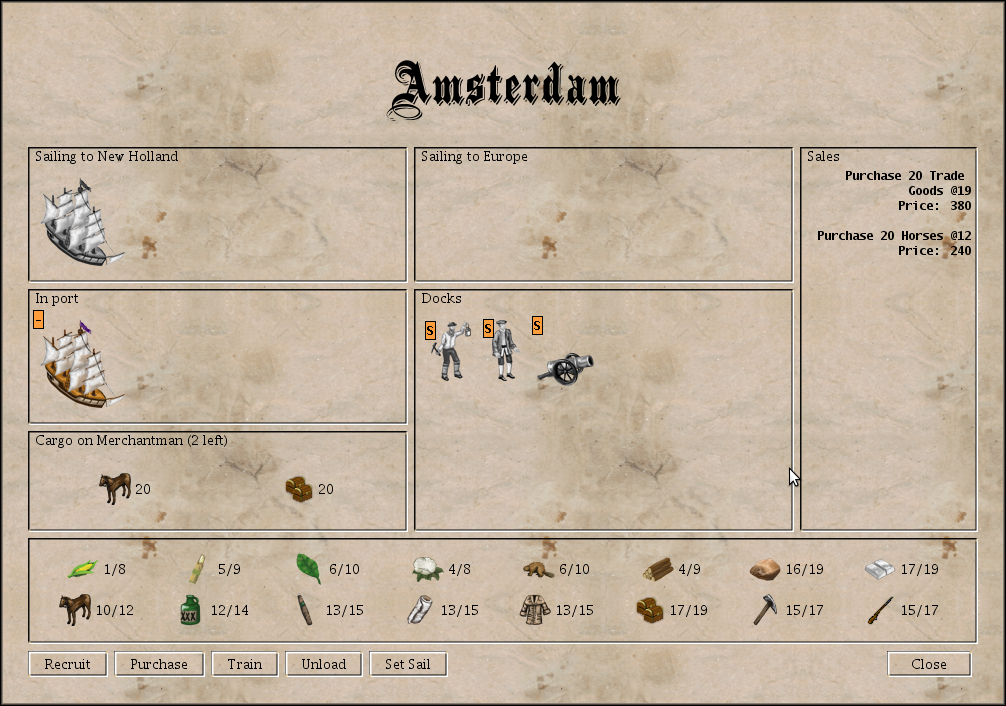
Figure 3.2: The Europe Panel
图3.2:欧洲面板________________________________________
In this panel, you can control the ships sailing between America and Europe,
as well as the ships currently docked in Europe. You can also buy goods,
recruit, purchase and train units. Units recruited, purchased or trained are
visible in the Docks Area in the Europe panel.
在这面板中,你能控制在美洲和欧洲之间航行的船,以及正停泊在欧洲港口的船。你也能
买货品、徵募、购买和训练单位。徵募、购买或训练来的单位能在欧洲面板的码头区看到
If a ship has set sail for Europe or America, you can change its direction by
dragging it from the Going to America box to the Going to Europe box (or vice
versa).
如果某艘船已经设定航行到欧洲或美洲,你能把船从「去美洲」格子拉到「去欧洲」格子
(或反过来)来更换目的地。
If a ship has docked at the European port you can drag and drop units between
the Docks and Cargo panel. You drag and drop goods between the Cargo panel
and the Market panel. If you want to buy or sell less than 100 units of
goods, press the shift key while dragging. This will allow you to specify how
many units you wish to transfer. If you press the “Unload” button, all
goods will be unloaded.
如果船已经停泊在欧洲码头了,你能在码头和货物面板之间拉放单位、在货物曼市场面板
之间拉放货品。如果你要买卖少於100单位的货品,就在拖曳时按shift键,这能让你设定
你要转移多少单位。如果你按「卸载」按钮,所有货物都会被卸载下来。
If any of the goods are displayed in grey, this means they are being
boycotted by the Crown because you refused a tax raise. You must pay your tax
arrears before you can trade these goods. You can do this by dragging the
goods as usual, in which case you will be given the chance to pay your tax
arrears (provided you have enough money). A small area at the top right of
the screen will keep track of how much money you made or spent and how much
taxes you paid.
如果有任何货品显示灰色,代表这些货品被国王抵制了,因为你拒绝接受税赋调涨。你必
须支付欠的税才能交易这些货品。要这样做,你可以向平常一样拖曳货品,然後(假如有
足够金钱的话)会给你机会来支付拖欠的税。萤幕右上角一个小区域会持续追踪你赚或花
了多少钱、你缴了多少税。
From time to time, new colonists eager to join you in the New World will
appear on the European Docks. If you are unwilling to wait, you can also
recruit new colonists by paying for their journey to the New World.
Alternatively, you can train expert units at the Royal University. Paying for
their education is expensive, however, and not all types of experts are
available in Europe.
有时,想要加入你一起去新世界的新殖民者会出现在欧洲码头上。如果你不想等这种人,
你可以自掏腰包出到新世界的旅费来徵募新血。要不然你也可以在皇家学院训练专业单位
,然而学费很贵,而且不是所有专业都能在欧洲受训。
Units present in Europe can also be armed, mounted, equipped with tools or
blessed as missionaries in Europe. In order to select one of these actions,
you need to right click on the unit. Note that you will have to pay for the
arms, horses or tools required to equip your units. Blessing a missionary,
however, is free.
在欧洲的单位也能装备器具、或者受祝福成为传教士。要选择这些动作,你需要右键点击
单位。记住你需要替武器、马或工具花钱好给你的单位,不过成为传教士是免费的。
In order to send a ship back to the New World, you must drag it to the Going
to America section of the Europe panel, or press the “Set sail” button.
要把船送回新世界,你要在欧洲面板把船拖到「去美洲」格子,或者按「启航」按钮。
--------------------------------------------------
3.5 The Colony panel 殖民地面板
--------------------------------------------------
The figure 3.3 represents the Colony panel.
图3.3是殖民地面板。
________________________________________
http://www.freecol.org/docs/images/colony_panel.png
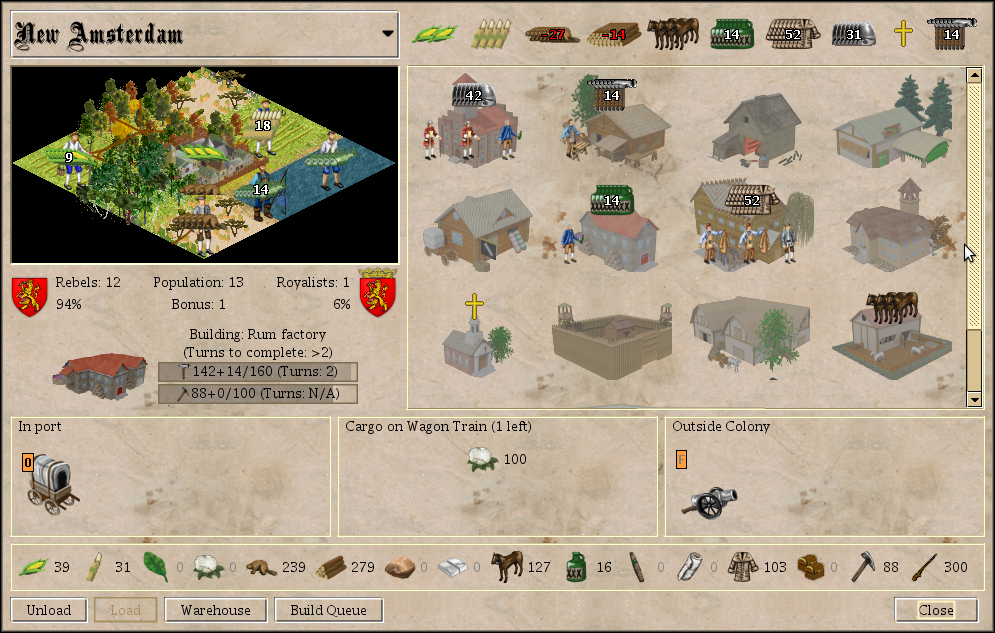
Figure 3.3: The Colony Panel
图3.3:殖民地面板
________________________________________
To view a colony’s panel, left click on it from the main screen. In this
panel, colonists can be assigned to cultivate tiles surrounding the colony,
to work in buildings, defend the colony against attackers or wait outside of
the colony.
要查看殖民地面板,要在主画面左键点击该殖民地。在这个面板中,能把殖民者分派去犁
殖民地附近的地砖、在建筑内工作、遭受攻击时防御殖民地或在殖民地外面等。
The select box at the top left of the panel displaying the name of the colony
can be used to select a different colony. You can also use the “left” and “
right” keys to “scroll” through your colonies. Next to the colony’s name,
the production panel shows all the goods your colony is producing.
左上角的选择区会显示殖民地的名字,可以从这里选择查看不同殖民地。你也能用左右方
向键来切换殖民地。在殖民地名称旁边,生产面板会显示所有你的殖民地目前能生产的货
品。
Below colony name, you can see the area surrounding the colony to the left
and a scroll pane displaying the buildings of the colony to the right. You
can drag and drop a unit on a tile or a building. Buildings only ever produce
a single type of goods. The tiles surrounding the colony can produce several
kinds of goods, however. If the unit is not producing the right kind of
goods, you can right click on the unit to select a different kind of work. If
a tile has a red border, then it can not be used—it is either assigned to
another colony or settlement, or is occupied by a hostile unit, or is a water
tile which can not be used until you have built docks. Note that if you drag
a unit onto a tile owned by the natives you may be offered the chance to
purchase the land.
在殖民地名称下面,分别是显示在左边、围绕在殖民地旁边的地区,以及显示在右边、显
示该殖民地所有建筑的卷动格。你能拖拉一个单位到一个地砖或建筑之中。建筑只能生产
一种货品,而殖民地周遭的地砖能生产数种货品。如果单位在生产不对的货品,你能右键
点击该单位让他做别的工作。如果一个地砖有红色外框,那这地砖无法使用─可能是属於
别的殖民地或居住地,或者被敌对单位占据、或者它是块水地砖,在你盖码头之前都无法
使用。记住如果你把一个单位拉到原住民拥有的地砖上,你可以选择是否要买下这块地砖
Below the surrounding area, you can see the population panel, which displays
the size of your colony, the number and percentage of colonists that support
independence, the number and percentage of colonists that support the crown,
as well as the current production bonus.
在周遭区下面,你能看到人口面板,它显示了你的殖民地的大小、支持独立的殖民者的数
量和比例、支持王室的殖民者的数量和比例、以及当前的生产加成。
Below the status panel, the port panel shows you any ships or wagon trains in
the colony. If there is at least one unit present, the cargo panel below the
port panel shows you the cargo of the selected carrier (if any).
在状态面板下方的运输面板会显示所有在你的殖民地内的船或蓬车队。如果里面至少有一
个单位在,旁边的货物面板会显示你选择的运输单位中装载的货物(如果有的话)。
On the right hand side of the panel, you can see the buildings panel, which
displays an image for every building in the colony, as well as the building
or unit currently being built. You can see the units working in a building,
as well as its production. If you let the mouse hover over a building, you
can see a slightly larger and more detailed view. You can click on any
building in order to open the build queue dialog, which enables you to create
a list of units and buildings to build.
在面板右边,你能看到建筑面板,里头有该殖民地里所有的建筑,以及目前正在生产中的
建筑或单位。你能看到在建筑里工作的单位,及该建筑生产的东西。如果你把游标停留在
一个建筑上,你能看到较大较详细的图像。你能点击任何建筑以开启建筑排程日志,你能
在里面安排一串接下来要生产的建筑或单位。
Below the buildings panel, the outside colony panel shows you which colonists
are present on the same tile, but are not working inside the colony. Any
units shown here are able to defend the colony against attacks.
在建筑面板下面,殖民地外部面板会显示哪些殖民者待在同一块地砖,但不在殖民地内工
作。这些显示在此的单位能替殖民地防御攻击。
Below this panels, you can see the colony’s warehouse area. You can drag and
drop goods from the warehouse to the cargo panel and vice versa in order to
load and unload your ships or wagon trains. Press the shift key while
selecting goods if you do not wish to select all the goods present, or less
than one hundred units.
在这个面板下方的是殖民地的仓库区。你能在仓库和货物面板之间拖拉货品,以替你的船
只或蓬车队装载或卸载货品。如果你不想选择所有货品,或是只要少於一百单位的货品,
那在选择货品时按住shift键。
The Warehouse can only hold a certain amount of goods of each type. Its
initial capacity is limited to 100 units of each type of goods, but it can be
increased to 300 by building two Warehouse Expansions. If the current limit
of the warehouse is exceeded, the number of goods is printed in red. If you
do not store the excess units elsewhere, they will be lost at the end of the
turn.
每种货品在仓库都只能存放一定的数量。初始容量被限制在每种货品一百单位,但能透过
扩张两次仓库来把上限提高到三百单位。如果货品数量超出仓库上限,那该货品的数字会
变成红色。如果你不把多出来的货品存到别的地方,那多的货品在该回合结束时都会消失
If you have already built a Custom House in the colony, you can export goods
to Europe automatically. Goods marked to be exported are printed in green.
Open the warehouse dialog (see below) in order to change export settings.
如果你已经在殖民地内盖海关了,你就能自动向欧洲出口货品。被标记要出口的货品会显
示绿色,开启仓库日志(看下方)以改变出口设定。
At the bottom of the Colony Screen, you will see a row of buttons, not all of
which are always active. These buttons will allow you to
在殖民地面板的最底下,你能看到一排按钮,并不是每个都随时能按。这些按钮能让你:
Unload the active ship or wagon train
替船或蓬车队卸载
Fill up all partially filled holds of the active ship or wagon train
(译注:这句看不太懂)
Open the warehouse dialog in order to change the export and warning levels
for all types of goods (see below)
开启仓库日志以改变所有种类货品的出口和警告等级(看下方)
Select which buildings or units to build (see below).
选择哪个建筑或单位要生产(看下方)
Close the dialog
关闭日志
You can drag and drop colonists to and from buildings, tiles surrounding the
colony, ships and the area outside of the colony. You can also use the right
click menu of any unit to assign it to a work place, equip it, or place it
outside of the colony (unless it already is outside of the colony).
你能拖拉殖民者进出建筑物、殖民地周遭的地砖、船舰和殖民地外的地区。你也能对任何
单位按右键叫出选单以派给他一个工作地点、替他装备或把他放到殖民地外面(除非他已
经在殖民地外面了)。
---------------------------------------------
3.5.1 The Warehouse Dialog 仓库日志
The warehouse dialog allows you to set the warning levels for all types of
goods. If you have turned on the warnings about goods levels, you will
receive a warning if the number of goods drops below the lower level or rises
above the higher level. In a warehouse with a capacity of 100 units of each
type of goods, the lower level is set to 10 and the higher level is set to 90
by default.
仓库日志能让你设定所有种类货品的警告等级。如果你开启这项功能,你会在货品的数量
掉到低水平之下或飙到收到高水平之上时收到警告。以一个各种货品容量为一百单位的仓
库来说,低水平数量是10而高水平数量是90。
The export level allows you to specify how many goods should be kept in
reserve if goods are automatically exported from this colony, either through
the Custom House, or by a carrier following a Trade Route. A checkbox
indicates whether this type of goods should be exported through the Custom
House or not. If you have not yet built a Custom House in this colony, the
checkbox is disabled.
出口等级能让你在货品透过运输路线或海关自动出口时,设定货品的保留数量。一个勾选
框会表示该类型货品是否要透过海关出口。如果你没在该殖民地盖海关,就不能选取该勾
选框。
---------------------------------------------
3.5.2 The Build Queue Panel 建筑排程面板
Clicking on a building (not one of the units working in the building) opens
the build queue panel, which allows you to select which items the colony
should build. The panel consists of three sub-panels, the unit panel on the
left, the buildings panel on the right and the build queue in the centre. You
can drag and drop items from the unit panel and the buildings panel to the
build queue and back. You can also double-click an item in the unit panel or
the building panel to add it to the build queue, and you can double-click an
item in the build queue to remove it. Right-click an item to see its entry in
the Colopedia.
点建筑(不是有单位在里面工作的建筑)开启建筑排程面板以选择要准备在该殖民地内盖
哪些东西。该面板包含三个子面板:左边的单位面板、右边的建筑面板以及中间的建筑排
程。你能从单位面板和建筑面板拖拉东西到建筑排程中好把他们加到排程里,你也能在建
筑排程中快按两下一个东西以从排程中移除掉。右键点击一个东西来看它进入Colopedia
的入口
(译注:不懂这句话意思)。
The panel contains a checkbox that switches between the compact view, which
shows only the names of the buildable items, and the icon view, which also
shows the goods required to build each item. Another checkbox allows you to
see items that the colony can not build at this time because it lacks the
necessary population, or because some other requirement has not yet been met.
You can also add these items, which are marked with a small lock icon, to the
build queue, but not as the head of the queue.
这个面板包含一个能切换两种相对外观的勾选框,一个只会显示能建造的物品名称以及图
像,一个还会显示要建造每个物品所需的货品。另一个勾选框能让你能让你看到殖民地目
前不能盖的物品,因为缺乏必须的货品或其他需求。你也能把这些物品加到建筑排程中,
这些物品会被标记一个小小的锁形图像,而且不会排到排程最前面。
The “buy building” button allows you to buy the building at the top of the
build queue, provided that you have enough gold.
「买建筑」按钮能让你在有足够金钱的情况下买下建筑排程最上面的建筑。
-----------------------------------------------
3.6 Customization 客制化
-----------------------------------------------
The FreeCol user interface can be customized to a certain degree. In the
directory where FreeCol is installed, you will find a sub-directory called
data, which contains configuration files and multimedia assets. These include
the images used to represent units, goods, buildings and various other
objects that appear in the game, sounds to play when certain events occur and
so forth. You can replace them if you wish.
FreeCol使用者介面能在某种程度上客制化。在FreeCol的安装路径中,你能找到一个名为
”data”的子路径,里面包含外观档案及多媒体资源。这里面有用来代表单位、货品、建
筑和各种其他出现在游戏中的图像、特定事件发生时会播放的音效以及其他的。你想要的
话可以替换它们。
The sub-directory data/base/ contains assets that are used for the user
interface in general, independent of the rules used for a particular game.
The sub-directory data/base/resources/fonts contains several fonts that are
distributed with FreeCol, including the file ShadowedBlack.ttf, which
contains the black letter font used to display headlines and the titles of
panels. The file data/base/resources.properties allows you to configure how
the assets are used.
子路径”data/base”里面有用於一般使用者介面的资源,这和使用於一场特定游戏的模
式是互相独立的(译注:看不太懂这句)。子路径”data/base/resources/fonts”内含
数种用於FreeCol的字体,包括档案”ShadowedBlack.ttf”,该档案是显示面板的大小标
题的黑色字体。档案” data/base/resources.properties”能让你安排要怎麽使用这些
资源。
The line
NormalFont=urn:font:Serif-PLAIN-13
for example, selects the font called “Serif” with font style “plain” and
font size 13. Instead of “Serif”, you could use any other font that is
known to the Java Virtual Machine of your system. In general, this includes
all fonts installed by the operating system (rather than individual
applications).
举例来说,这一行:
NormalFont=urn:font:Serif-PLAIN-13
会选择名为”Serif”的字体、字体式样”朴素”及字体大小13。你可以用你的系统里的
Java虚拟机所有的其他字体来取代”Serif”。一般来说,这包含了所有安装在作业系统
里的字体(远超过一个人所需要的)
Please note that FreeCol uses a Uniform Resource Identifier (URI) to identify
the font. For this reason, you must obey the usual quoting rules. In
particular, you must use the string %20 instead of a space character in the
font name.
请记住FreeCol是使用统一资源标志符(Uniform Resource Identifier , URI)定义字体,
因此你必须遵守URI的规定。比较特别的是,你必须用字串”%20”代替字体名称中的空格
If you are using Java 1.6 or higher, you can also use fonts that are not
known to the JVM. You can copy it to the fonts directory mentioned above and
add it to the configuration file by adding a line like this:
如果你是用Java 1.6以上的版本,你也能使用那些JVM(Java虚拟机)不知道的字体。你
能把那些字体复制到上面提到过的字体路径并加到外观档案中,只要向这样加入一条指令
MyFavouriteFont=resources/fonts/Chancery.ttf
Then you could say:
那你能说:
NormalFont=urn:font:Black%20Chancery-PLAIN-13
Instead of MyFavouriteFont, you can key any you like, as long as it is not
being used for anything else. This line will add your font to the list of
fonts known to the JVM, and you can then use its name, which is, however,
likely to differ from the file name. The file Chancery.ttf, for example,
contains a font called “Black Chancery”.
你能输入任何你喜欢的字体取代” MyFavouriteFont”,只要这字体还没被用在别的地方
。这条指令会把你的字体加入JVM能辨识的字体清单之中,你之後就能使用这个名字,但
可能会和档案名称不一样。举例来说,档案” Chancery.ttf”中的字体叫做” Black
Chancery”。
=============================
没想到连编辑都这麽累......
希望看完整篇的人能给我指正建议,感谢>"<
--
到那时,在壁炉边,当孙子坐在某位老人的膝盖上,问道:「爷爷,你在亡灵天灾入侵的
时候干什麽呢?」 而他不用尴尬地干咳一声,把孙子移到另一个膝盖上,吞吞吐吐地说
:「啊……爷爷我当时在纳格兰挖牛羊粪。」与此相反,他可以直盯着他的眼睛理直气壮
地说:
「孙子,爷爷我当年在血色十字军和那个狗娘养的阿比迪斯并肩作战!」
~《血色全书》 第一章第二节
--
※ 发信站: 批踢踢实业坊(ptt.cc)
◆ From: 114.40.22.21
1F:→ o07608:103页......这是我发过第二长的文章的样子...... 10/10 23:56
2F:→ o07608:最长的是笨板十里坡剑神的备份文 10/10 23:56
3F:推 THC13:分量多的话,要不要移到其他更方便的平台,大家一起做? 10/11 00:28
这算是份自我鞭策的作业吧XD 还是想先自己独立翻译看看
4F:推 THC13:--freecol-data DIR指定含有FreeCol资料档的目录(资料夹)。 10/11 00:30
5F:→ THC13:只有当你已经安装修改过的FreeCol, 10/11 00:30
6F:→ THC13:你才需要这个这个指令。 10/11 00:31
7F:→ THC13:(其实就是叫游戏去读取MOD档案所在的目录啦) 10/11 00:32
8F:推 THC13:--debug-run[=]TURNS[,SAVENAME] 这段我觉得不用翻译 10/11 00:40
9F:→ THC13:正常人不会用到,会用到的人不会不懂英文 ;> 10/11 00:41
囧a
能的话我还是希望能补完整份文件的翻译啦......
10F:推 THC13:“artillery in the open” penalty 10/11 00:46
11F:→ THC13:我猜是炮兵在开阔地形所受到的战力惩罚(没有掩护) 10/11 00:47
感谢你的帮忙!
12F:推 s2327259:Save Production Overflow,感觉翻成 10/11 13:49
13F:→ s2327259:「保留过量的生产力」会比较恰当 10/11 13:50
感谢你的修正!
※ 编辑: o07608 来自: 114.40.22.21 (10/11 22:15)
14F:→ o07608:第四章光是草原就有三种,我老天 10/11 23:02
15F:推 THC13:Season Year是这样的 原版游戏一开始一年一回合 11/03 13:38
16F:→ THC13:某个年份後会变成一年两回合(两季) 反应科技进步 11/03 13:38
17F:→ THC13:我猜这里的设定是选择直接一开始就一年两季 11/03 13:39
18F:→ o07608:感谢!!! 11/03 13:40